Microsoft Demo Management System
Design of a new platform for managing Microsoft's in-store PC demos across 25,000 retail stores, replacing two disconnected legacy tools.
Overview
The Demo Management System powers every product demo you see on a Windows PC in a retail store such as Best Buy, MediaMarkt, FNAC, JB Hi-Fi, and dozens more. Microsoft admins, OEM partners like Dell and HP, and retail operators all use it to create, customize, target, and deploy localized demo experiences. I owned end-to-end UX strategy, user research, product requirements, and high-fidelity design for the full platform redesign.
25K+
Retail Stores
210K+
Devices Managed
30+
OEM & Retail
Partners
The Challenge
Managing demo content meant a patchwork of legacy systems held together with spreadsheets, PowerPoint decks, and hand-edited JSON. The job was to understand those workflows end to end and replace them with one platform.
Demo lifecycle
Hover a stage
1
Set up the data
2
Create the demo
3
Localize it
4
Target & deploy
5
Review & approve
6
Measure & learn
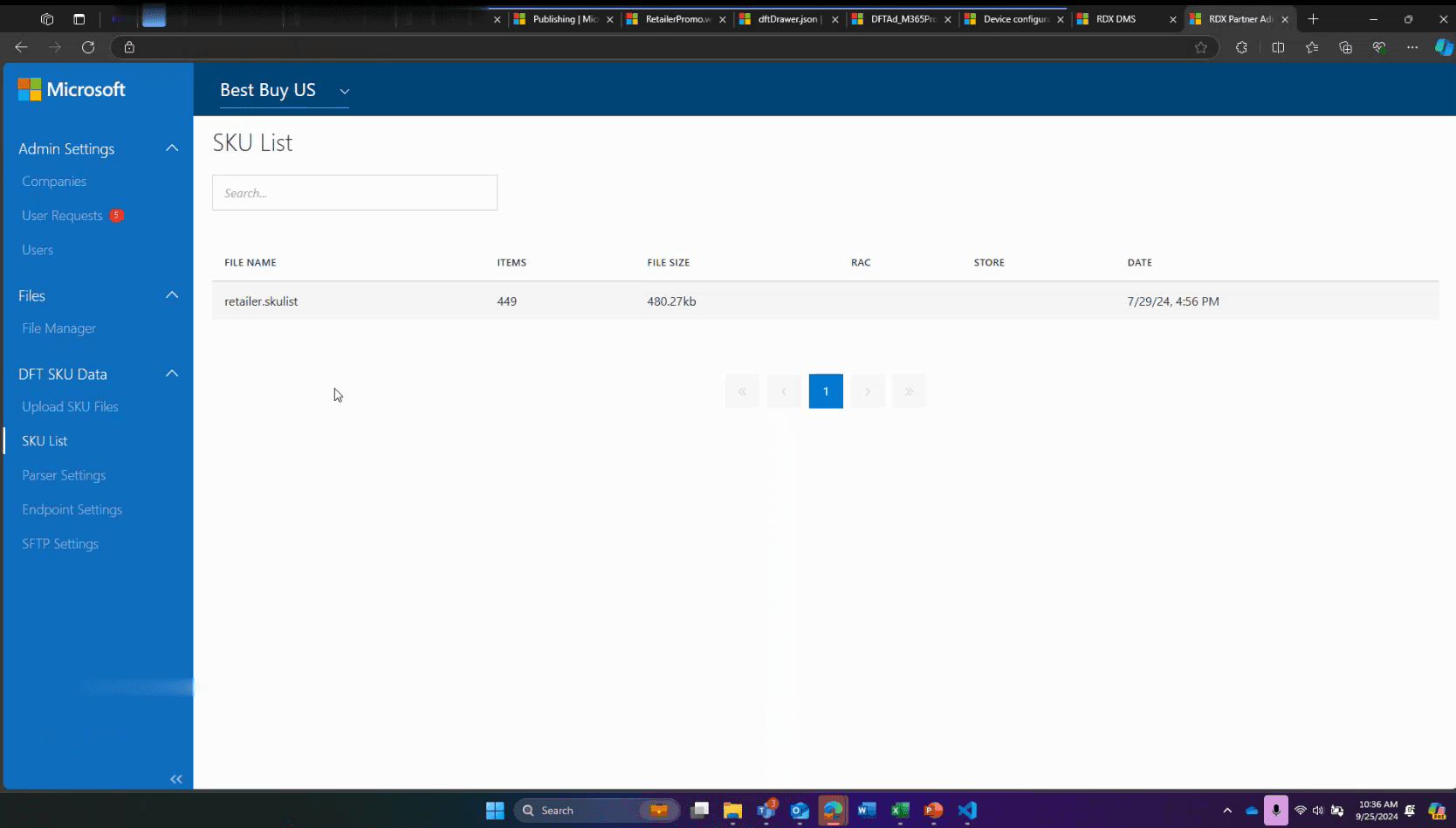
Set up the data
SKU mapping lived in per retailer flat files with no validation, and partner data was scattered across external docs. Every job in the pipeline started with a request to one of two Microsoft admins.
INSIGHT
Manual work was the only theme rated Very High in the research. Every product release started with hand-built Excel files.
Research & Discovery
I led a multi-method research effort to ground the redesign in evidence.
9 stakeholder interviews
5 admins, 3 OEM partners, 1 retail partner
Competitive benchmark
In-store audits
How demos actually looked on devices in the field
Telemetry & device data
What the current system could and couldn’t tell us
AI in the workflow
I used ChatGPT to help organize the research matrix I was working on, and assist with drafting the research report. ChatGPT worked like a fast research assistant. The analysis and conclusions stayed mine.
How the research was run
From 43 job stories to 5 jobs
The interviews produced 11 jobs to be done, broken into 43 job stories. I didn’t design against all 43. I scored every job on two questions — how many users does it block today, and how directly does it close one of the six breakdowns — and defined a measurable outcome for each. Five jobs carried the weight of the first release; the rest were sequenced behind them. Those five jobs map one-to-one onto steps in the journey.
Set up content models & partner data
7 job stories
Create & customize demo experiences
4 job stories
Preview & test demo content
3 job stories
Manage targeting & deployment
4 job stories
Review & approve content
3 job stories
Access telemetry & analytics
5 job stories
Ensure security & access control
3 job stories
Facilitate collaboration & communication
3 job stories
Run ad campaigns
3 job stories
Manage device provisioning & configuration
6 job stories
Deploy content to offline environments
2 job stories
Personas
Three core personas drove the redesign. Each card names the scope they own and the jobs they carry in the six-step journey — the solutions come later.
Persona
Microsoft Admin
Govern the platform and keep global demos accurate, without being everyone’s bottleneck.
The pain
Mapped SKUs by hand in Excel, hand-edited JSON to configure targeting, and personally fielded every partner change request.
Key jobs
Set up content models & partner data · review & approve · access telemetry.
Persona
Brand Partner (OEM)
Publish on-brand, localized demos for my products on my own schedule.
The pain
Locked out by IT policies and boxed into rigid templates, waiting on a Microsoft admin for every edit and brand tweak.
Key jobs
Create & customize demos · localize per market · target & deploy.
Persona
Retail Partner
Keep in-store demos current and correct, even where connectivity is unreliable.
The pain
No offline workflow and no preview: errors only surfaced on the physical device once it was already in the store.
Key jobs
Set up store & SKU data · target at store level · preview on-device.
Key Decisions
I drove the prioritization as the voice of the user.
Step 1 · Frame the jobs
Framed as jobs to be done
Every pain point from research became a job story with a clear desired outcome, so the roadmap described real user goals across all three personas, not a wishlist of features.
Step 2 · Anchor to metrics
Anchored to success metrics
Each job carried a concrete target: CSAT, customer-effort score, fewer post-live errors, fewer support tickets. That defined what success had to look like before anything was called done.
Step 3 · Score impact against effort
Impact came from my research: how many users a job blocked and how often its pain came up. I scored effort in working sessions with the engineering lead, covering design effort as well as build.
Lower impact ↑ Higher impact
Ship first
Foundation bets
Easy adds, later
Defer
Lower effort → Higher effort
P0 · Must
ships first
P1 · Should
next iteration
P2 · Nice
future backlog
Success metrics, defined up front
Before anything was built, every P0 job got a measurable target; so success was defined before a single screen shipped:
Cycle time halved from the 10-business-day SLA; 90% of approvals happen in-platform.
Eliminate the standing stream of targeting-correction support emails to the admin team.
Fewer than 10% of devices with content errors per seasonal cycle.
70% of partner requests handled in-platform instead of via the two admins; 80% of ad campaigns launched self-service.
Partner effort score of 1–3 (CES) for demo creation; top-box satisfaction on core jobs.
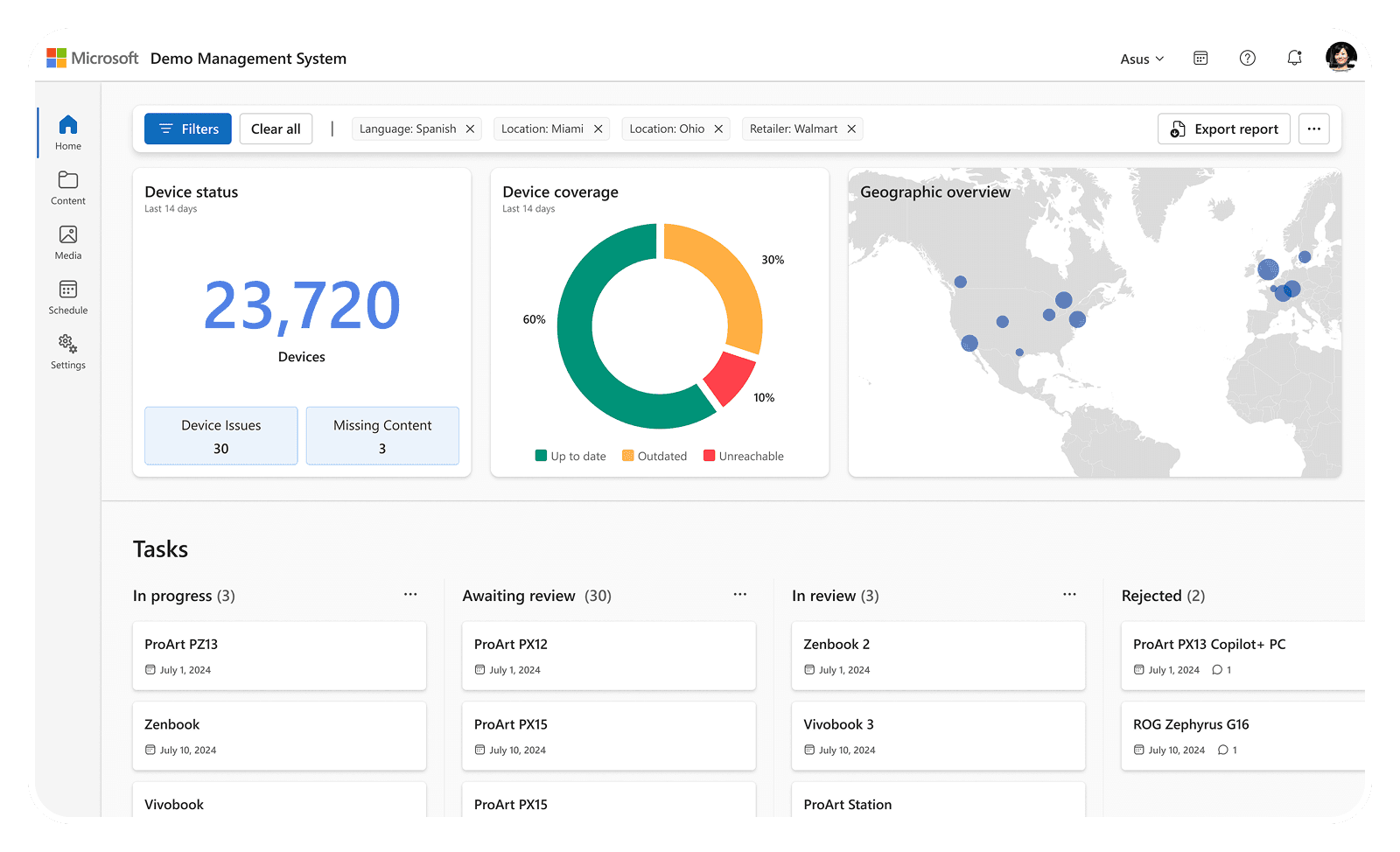
Telemetry from 210K devices; 3 A/B tests per quarter once baselined.
One shared model: admins define the structure, OEMs fill it with content, retailers ground it in stores and devices. No partner sees another's data.
Owns the structure
Microsoft Admin
Content models → Permissions → Approvals → Audit
Members · Integrations
Owns the content
Brand Partner (OEM)
Partner → Brand → Product Series → Model
Brand assets · Features · Demos · Campaigns · Media · Translations
Owns the retail footprint
Retail Partner
Stores → SKUs → Devices
Device provisioning · Store-level targeting · Offline packages
Shared by all roles
Preview · Comments · Version history · Telemetry dashboards
The competitive analysis made the case for adopting a headless CMS, and I recommended Adobe Experience Manager. Leadership weighed cost and long-term control and chose to build in-house. My benchmark became the bar for that build: match what the industry already solved, and add what no product offered, like store-level targeting for 25,000 stores, device preview, telemetry, and offline deployment.
The first release shipped the complete six-step journey.
In for Release 1
One place for partner, store, and SKU data
Replaces the spreadsheets and flat files
Guided targeting
Choose where a demo appears without guesswork
Built-in localization
Translate a demo without cloning it per market
Preview & testing
See exactly what shoppers will see before it ships
In-platform review & approval
Approvals happen in the system, not over email
Telemetry dashboards
See how demos perform in stores
Deferred, with rationale
A/B testing
Needs a baseline of live data to test against
Advanced offline deployment
Only a few stores lack connectivity; manual packages cover them for now
Automated content optimization
Requires engagement data the platform is only now collecting
Brand customization controls
Templates cover launch needs while engineering builds the theming layer
AI in the workflow
ChatGPT helped maintain the PRD as a living document. Every scope deferral logged with its rationale as decisions were made.
Design Solution
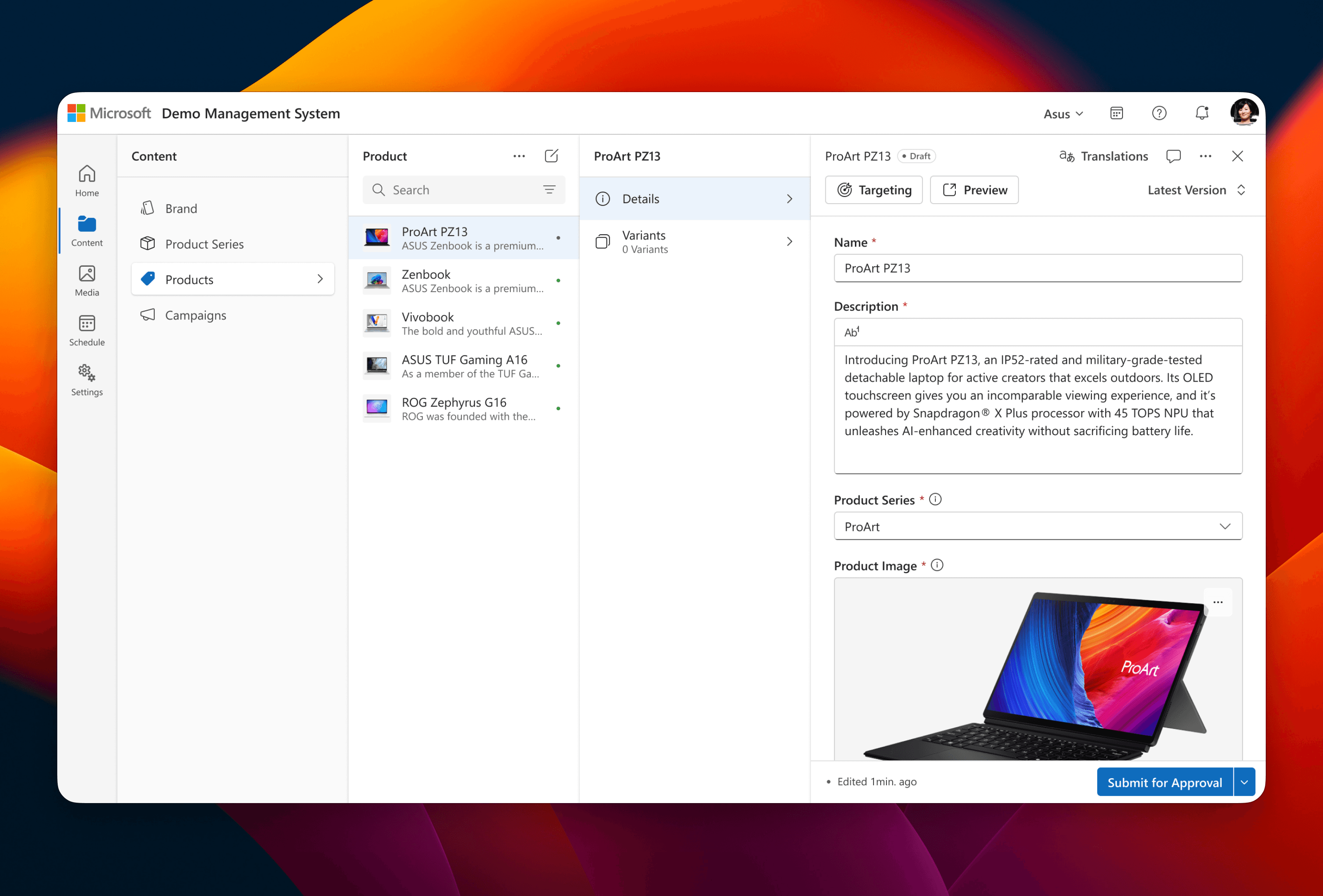
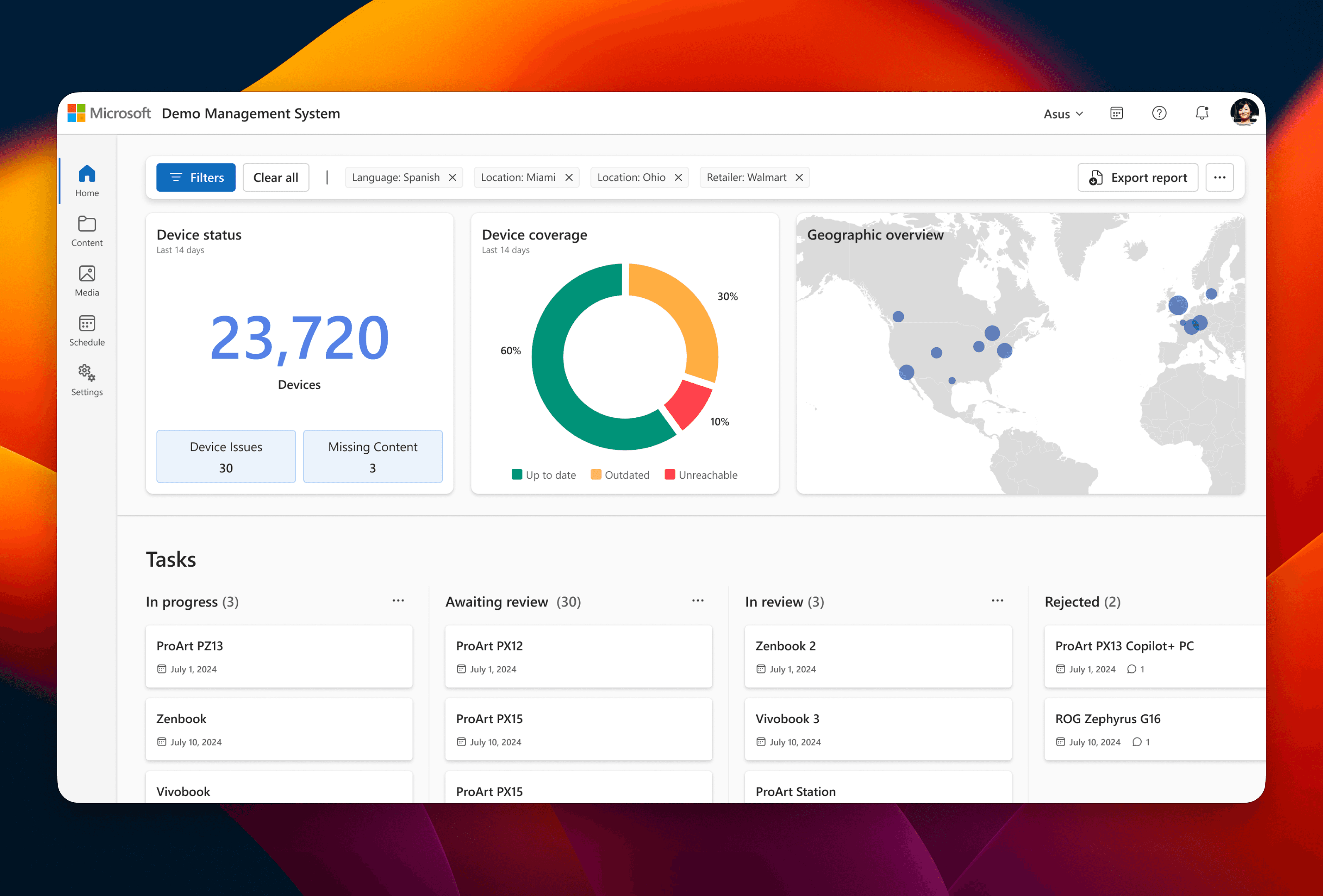
High-fidelity screens in Microsoft’s Fluent 2 design system, light and dark themes — 700+ screens across 60+ flows. The six solutions below follow the same six steps as the Challenge. Each one names the pain it closes, the job it serves, and who does it.
AI in the workflow
I used Bolt and ChatGPT to prototype complex controls like the targeting interface, testing several directions in hours instead of days, then built the winner in Figma.
Follow along each step in the journey, the pain it closes, the job it serves, the before and after.






Impact
The redesign shipped to engineering on schedule in July 2025: 700+ screens across 60+ flows, and a PRD covering all 11 jobs and 43 job stories with acceptance criteria.
Results vs. the targets we set
Every KPI was set in scoping and instrumented in the platform. The numbers:
54%
faster approvals
a 10-day SLA down to 4.6 days
92%
of approvals happen in the platform
up from none
74%
of partner requests are self-service
the two-admin bottleneck is gone
Zero
targeting support tickets
validation ended an entire support category
2.3
effort score for demo creation
inside the 1–3 target
7%
content error rate per cycle
measured for the first time, and under target
82%
of campaigns launch without an admin
up from none
210K
devices reporting engagement
the platform’s first behavioral data
Why it matters commercially. The in-store demo is where a Windows sale is won or lost. Before the redesign, partners worked around the very platform that powers it. Making DMS the easiest path to a great demo puts one in front of every shopper at the moment they decide.
Platform management shifted from two people to every partner. Six steps, one system. For the first time, every decision about what 25,000 stores display has data behind it.